#前言
这个系列是用来记录笔者观看 Vue 源码的一些理解,可能理解会有些偏差,但过一段时间再看 Vue 源码,再看看这篇文章,可能又会有更深入的理解,所以会反复勘误。
本文基于 Vue 2.16.14 版本
#思考
计算属性的特点是基于它们的响应式依赖进行缓存的,只有在响应式依赖发生改变时,才能重新会重新求值,这就意味着,当计算属性中的响应式依赖未发生改变时,计算属性会立即返回之前计算的结果,那么 Vue 是怎么把计算属性和响应式依赖关联起来的呢?
#核心源码分析
当组件初始化的时候,如果组件中有 computed 属性,那么则会 initComputed:
const computedWatcherOptions = { lazy: true }
function initComputed (vm: Component, computed: Object) {
  // $flow-disable-line
  const watchers = vm._computedWatchers = Object.create(null)
  // computed properties are just getters during SSR
  const isSSR = isServerRendering()

  for (const key in computed) {
    const userDef = computed[key]
    const getter = typeof userDef === 'function' ? userDef : userDef.get
    if (process.env.NODE_ENV !== 'production' && getter == null) {
      warn(
        `Getter is missing for computed property "${key}".`,
        vm
      )
    }

    if (!isSSR) {
      // create internal watcher for the computed property.
      watchers[key] = new Watcher(
        vm,
        getter || noop,
        noop,
        computedWatcherOptions
      )
    }

    // component-defined computed properties are already defined on the
    // component prototype. We only need to define computed properties defined
    // at instantiation here.
    if (!(key in vm)) {
      defineComputed(vm, key, userDef)
    } else if (process.env.NODE_ENV !== 'production') {
      if (key in vm.$data) {
        warn(`The computed property "${key}" is already defined in data.`, vm)
      } else if (vm.$options.props && key in vm.$options.props) {
        warn(`The computed property "${key}" is already defined as a prop.`, vm)
      } else if (vm.$options.methods && key in vm.$options.methods) {
        warn(`The computed property "${key}" is already defined as a method.`, vm)
      }
    }
  }
}- 首先创建
computed Watcher,并往组件实例上挂载_computedWatchers属性 - 判断当前环境是否是
SSR服务端渲染 - 循环
computed属性,拿到每一个key,为其创建computed Watcher - 检验每个计算属性是否与
props或者data里的属性重复,若重复则在生产环境下报错。
这里的第3点 new Watcher 是传入 const computedWatcherOptions = { lazy: true },意味着初始化计算属性的时候并不会立刻进行求值:
class Watcher {
  constructor (
    vm: Component,
    expOrFn: string | Function,
    cb: Function,
    options?: ?Object,
    isRenderWatcher?: boolean
  ) {
    // ...ignore
    if (options) {
      this.lazy = !!options.lazy
    }
    this.dirty = this.lazy
    this.value = this.lazy
      ? undefined
      : this.get()
  }
}
那么在什么时候 computed 属性会被触发?在 Render 函数执行到对应计算属性时,它的 getter 函数就会被触发。
它的 getter 函数在哪里定义?答案是在 defineComputed 方法中。
export function defineComputed (
  target: any,
  key: string,
  userDef: Object | Function
) {
  const shouldCache = !isServerRendering()
  if (typeof userDef === 'function') {
    sharedPropertyDefinition.get = shouldCache
      ? createComputedGetter(key)
      : createGetterInvoker(userDef)
    sharedPropertyDefinition.set = noop
  } else {
    sharedPropertyDefinition.get = userDef.get
      ? shouldCache && userDef.cache !== false
        ? createComputedGetter(key)
        : createGetterInvoker(userDef.get)
      : noop
    sharedPropertyDefinition.set = userDef.set || noop
  }
  if (process.env.NODE_ENV !== 'production' &&
      sharedPropertyDefinition.set === noop) {
    sharedPropertyDefinition.set = function () {
      warn(
        `Computed property "${key}" was assigned to but it has no setter.`,
        this
      )
    }
  }
  Object.defineProperty(target, key, sharedPropertyDefinition)
}
这个函数主要是使用 Object.defineProperty 将 component 上的属性挂载到 vm 组件实例上,并代理了它的 getter 和 setter 属性。
get 属性对应的是 createComputedGetter 函数,而 set 在开发中比较少用到,一般是空函数。这里我们重点关注一下 computedGetter 函数,它也就是我们在 Render 函数触发计算属性时执行的方法。
function createComputedGetter (key) {
  return function computedGetter () {
    const watcher = this._computedWatchers && this._computedWatchers[key]
    if (watcher) {
      if (watcher.dirty) {
        watcher.evaluate()
      }
      if (Dep.target) {
        watcher.depend()
      }
      return watcher.value
    }
  }
}
首先介绍一下 if 条件中的 watcher.dirty 属性:
dirty为true,说明数据已经“脏了”,需要更新dirty为false,说明数据不是“脏数据”,不需要更新
在首次渲染页面的时候,computedGetter 方法将会被 watcher 实例中的 get 方法触发,那么这时候这里的 watcher.dirty 值是 true, 因为在初始化 compupted 的时候传入了 lazy = true。
那么 evaluate 方法就会被执行:
evaluate () {
  this.value = this.get()
  this.dirty = false
}
当我们执行 this.get() 方法时,就会执行 this.getter 函数,这个函数在计算属性初始化 new Watcher 时传入的第二个参数(计算属性定义的单个函数)
所以 evaluate 主要做了两件事:
- 执行由
Render函数触发的compupted中对应的计算函数 - 将
watcher.dirty设置为false
接下来举个例子来说明 evaluate 中的这两行代码是怎么样将计算属性是如何和响应式依赖关联在一起的
#例子
new Vue({
  el: '#app',
  template: `
  <div>
    <span>{{ person }}</span>
    <button @click="changeAge">Change Age</button>
  </div>`,
  data() {
    return {
      age: 18
    }
  },
  computed: {
    person() {
      return 'xiaohao' + this.age
    }
  },
  methods: {
    changeAge() {
      this.age = 3
    }
  }
})
当渲染函数读取 person 变量的时候,会执行我们在计算属性初始化的函数 computedGetter,然后再到上面说的 evaluate 方法,执行这里的 get 方法,实际上执行的就是 person 方法,它里面有一个响应式数据 age。访问 age ,就会触发它自身的 getter 方法来收集依赖,就跟 Vue 的响应式模型相关了:
  Object.defineProperty(obj, key, {
    enumerable: true,
    configurable: true,
    get: function reactiveGetter () {
      const value = getter ? getter.call(obj) : val
      if (Dep.target) {
        dep.depend()
        if (childOb) {
          childOb.dep.depend()
          if (Array.isArray(value)) {
            dependArray(value)
          }
        }
      }
      return value
    },
    ...
  })
执行 dep 实例的 depend 方法,收集依赖:
class Dep {
  depend () {
  if (Dep.target) {
    Dep.target.addDep(this)
  }
}
  ...
}
这里 Dep.target, 是在计算 Watcher 中 get 方法 中的 pushTarget 方法将当前计算 Watcher 实例挂载到 Dep.target 上,我们进入 addDep 方法:
class Watcher {
  addDep (dep: Dep) {
  const id = dep.id
  //防止同一Watcher被多次收集
  if (!this.newDepIds.has(id)) {
    this.newDepIds.add(id)
    this.newDeps.push(dep)
    // 防止数据变更的时候,避免同一个Watcher依赖被多次收集
    if (!this.depIds.has(id)) {
      dep.addSub(this)
    }
  }
}
  ...
}

class Dep {
  addSub (sub: Watcher) {
  this.subs.push(sub)
}
...
}最终计算 Watcher 实例会被加入到响应式数据 age dep 中的 subs 数组中,函数执行栈如下图所示:
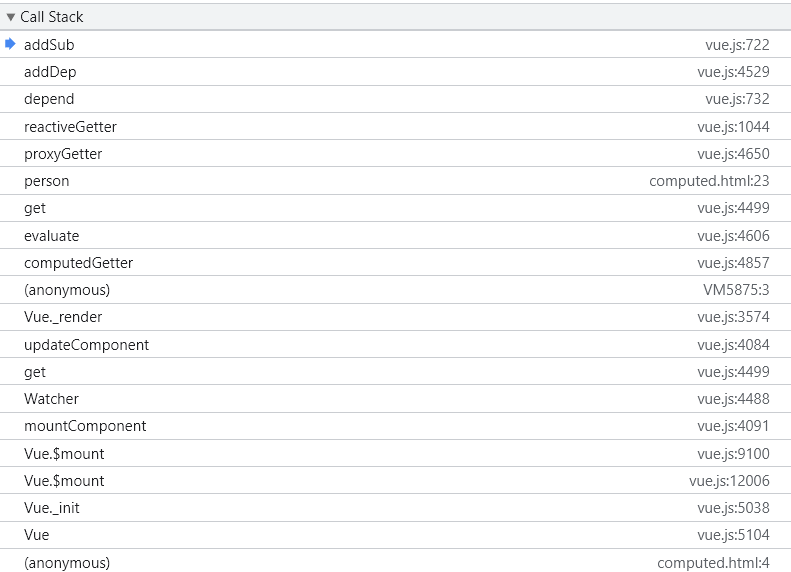
在 subs 加入计算 Watcher 实例后,函数将会逐个弹出执行栈,回到计算 Watcher get 方法中:
class Watcher {
  get () {
  pushTarget(this)
  let value
  const vm = this.vm
  try {
    value = this.getter.call(vm, vm)
  } catch (e) {
    if (this.user) {
      handleError(e, vm, `getter for watcher "${this.expression}"`)
    } else {
      throw e
    }
  } finally {
    if (this.deep) {
      traverse(value)
    }
    popTarget()
    this.cleanupDeps()
  }
  return value
}
}
在计算函数执行完毕后就返回了计算结果:“xiaohao18”,之后通过 popTarget 推出当前的计算 Watcher:
const targetStack = []
function popTarget () {
  targetStack.pop()
  Dep.target = targetStack[targetStack.length - 1]
}
实际上当前的 targetStack 中保留着两个 Watcher 实例:组件渲染 Watcher 和 计算 Watcher。这个函数的作用就是在 targetStack 中推出计算 Watcher,将 Dep.target 设置成组件渲染 Watcher。
这样 get 函数也执行完毕了。回到计算 Wathcer 的 evaluate 函数:
class Watcher {
    /**
   * Evaluate the value of the watcher.
   * This only gets called for lazy watchers.
   */
  evaluate () {
    this.value = this.get()
    this.dirty = false
  }
  ...
}
我们可以看到将 dirty 属性设置成了 false。 那么我们也能想到,dirty 作为一个锁,有 false ,那么很明显也会有 true,那么它在哪里呢?
class Watcher {
  update () {
  /* istanbul ignore else */
  if (this.lazy) {
    this.dirty = true
  } else if (this.sync) {
    this.run()
  } else {
    queueWatcher(this)
  }
}
...
}
我们看到第一个 if 的条件 this.lazy,它将dirty 设置成了 true。之前 Vue 在初始化 computed 选项的时候往计算 Watcher 中传入的 lazy 选项是 true。所以当我们点击上面例子中的按钮“changeAge”的时候,响应式数据 dep.notify 方法将会触发:
class Watcher {
  notify () {
  // stabilize the subscriber list first
  const subs = this.subs.slice()
  if (process.env.NODE_ENV !== 'production' && !config.async) {
    // subs aren't sorted in scheduler if not running async
    // we need to sort them now to make sure they fire in correct
    // order
    subs.sort((a, b) => a.id - b.id)
  }
  for (let i = 0, l = subs.length; i < l; i++) {
    debugger
    subs[i].update()
  }
}
  ...
}
这时的 subs 中存在两个实例: ['计算Watcher', '组件渲染Watcher'],当我们执行计算 Watcher 的 update 方法的时候,就会把计算 Watcher 的 dirty 属性设置成 true。那么接下来在渲染函数中再一次触发 person 变量的时候会访问 computedGetter 函数:
function createComputedGetter (key) {
  return function computedGetter () {
    const watcher = this._computedWatchers && this._computedWatchers[key]
    if (watcher) {
      if (watcher.dirty) {
        watcher.evaluate()
      }
      if (Dep.target) {
        watcher.depend()
      }
      return watcher.value
    }
  }
}
此时的 watcher.dirty 就是 true, 接着 evaluate 方法就会重新执行我们的 person 计算方法,这样就完成了响应式变量改变触发计算属性中方法的重新执行。
#总结
在 Vue 初始化 computed 选项的时候,会为 computed 中每一个函数配备一个观察者实例,并在渲染函数触发计算函数时会触发函数中的响应式数据(如果有),将当前计算属性的 Watcher 实例加入到响应式变量的观察者数组中,当响应式变量改变时,会遍历响应式遍历的数组,执行里面的观察者实例的 update 方法,在渲染函数会执行计算函数,这就做到了,响应式变量一改变,计算函数也会跟着执行的效果,这就是 computed 的内部实现原理。
#最小化实现
可以在这里的 demo 看到 computed 最小化实现